Friday, May 13, 2016

Creating simple xml file using Drupal

Here is the snippet to create an xml file using our custom module. We can customise tags, attributes and values for the xml elements.

    $dom = new DomDocument('1.0');

    //add root - <parent>
    $parent = $dom->appendChild($dom->createElement('parent'));

    //set attributes to <parent> tag
    $parent->setAttribute("name", "parent1");

    //add <child1> element to <parent>
    $child1 = $parent->appendChild($dom->createElement('child1'));

    //add elements to <child1>
    $schema = $child1->appendChild($dom->createElement('schema'));
    $schema->appendChild($dom->createTextNode('Schema Name')); //add <title> text node element to <schema>
    $schemaversion = $child1->appendChild($dom->createElement('schemaversion'));
    $schemaversion->appendChild($dom->createTextNode('1.1.0'));

    //add <child2> element to <parent>              
    $child2 = $parent->appendChild($dom->createElement('child2'));
    //add elements to <child2>
    $listr = array('value1','value2');

    $i = 1;
    foreach ($listr as $parent => $href) {
                $baby = $child2->appendChild($dom->createElement('baby'));
                $baby->setAttribute("href", $href);
                $baby->setAttribute("type", "webcontent");
                $baby->setAttribute("intendeduse", "unspecified");
                $babyfile = $baby->appendChild($dom->createElement('file'));
                $babyfile->setAttribute("href", $href);
                $i++;
    }

    // generate xml
    $dom->formatOutput = true; // set the formatOutput attribute of dom Document to true
    $test1 = $dom->saveXML(); // save XML as string or file
    $dom->save('simple.xml'); // save as file 

Simple Drupal CRON

Here is the snippet for simple cron using custom module. We are just calling a function while executing the cron (menucallback).

/**
 * Implements hook_cronapi().
 */
function modulename_cronapi($op, $function=NULL) {
    switch ($op) {
        case 'list':
            return array('modulename_cronname' => t('CRON Human Readable Name'));
        case 'rule':
            return '*/20 * * * *';
        case 'execute':
            return 'menucallback';
    }
}

After this refresh the module cache and go to admin/config/system/cron to view this newly created cron.

Wget to download your site HTML pages

Here is the snipped to download your site as html with some restriction,

- This will not download jpeg,jpg,png,gif,mpeg,mp4 files.
- This will not download files under 'anyfolder' (sites/anyfolder)
- This will download your files inside 'files' (sites/files)

wget -p -nH --restrict-file-names=nocontrol -R jpeg,jpg,png,gif,mpeg,mp4 -X sites/anyfolder --html-extension -e robots=off --base=./ -k -P sites/files

Delete a directory recursively

Here is the snippet to delete the folder and its children folder, files recursively.

function delete_directory($dir) {
    if ($handle = opendir($dir)) {
        while (false !== ($file = readdir($handle))) {
            if ($file != "." && $file != "..") {
                if(is_dir($dir.$file)) {
                    if(!@rmdir($dir.$file)) { // Empty directory? Remove it
                        delete_directory($dir.$file.'/'); // Not empty? Delete the files inside it
                    }
                }
                else {
                   @unlink($dir.$file);
                }
            }
        }
        closedir($handle);
        @rmdir($dir);
    }
}

db_merge combination of db_insert and db_update

In drupal 7, there is a something new for table insertion and update. That is called db_merge which combines db_insert and db_update in a single query for single or multiple row insert and update.

$query = db_merge('table_name')
                ->insertFields(array(
                    'field1' => value1,
                    'field2' => value2,
                    'field3' => value3,
                ))
                ->updateFields(array(
                    'field3' => value3,
                ))
                ->key(array('field2' => value2))
                ->execute();

Tuesday, July 30, 2013

Difference between InnoDB and MyISAM?

Three Major Difference:
  • First major difference I see is that InnoDB implements row-level lock while MyISAM can do only a table-level lock. 
  • You will find better crash recovery in InnoDB. However, it doesn’t have FULLTEXT search indexes, as does MyISAM.
  • InnoDB also implements transactions, foreign keys and relationship constraints while MyISAM does not.

How to create the table using module?

/**
* Implements hook_schema().
*/


function module_name_schema() {
$schema['module_name'] = array(
‘fields’ => array(
‘type’ => array(‘type’ => ‘varchar’, ‘length’ => 15, ‘not null’ => TRUE, ‘default’ =>
‘node’),
‘id’ => array(‘type’ => ‘int’, ‘unsigned’ => TRUE, ‘not null’ => TRUE, ‘default’ => 0),
‘module_name’ => array(‘type’ => ‘varchar’, ‘length’ => 255, ‘not null’ => TRUE,
‘default’ => ”)
),
‘primary key’ => array(‘type’, ‘id’),
);
return $schema;
}


/**
* Implements hook_uninstall().
*/


function module_name_uninstall() {
// Clear variables
variable_del(‘module_name_default’);
}

Use db_drop_table method in install file to drop the table using module.

How can we improve the Drupal site performance?

To increase the Drupal Site performance, try for below mentioned things,
  1. Use PHP APC, 
  2. Use memcache, 
  3. Use the Varnish. 
Most important module
  • Use the Boost module. 
  • Use Views Cache.
For very high traffic, 
  • Use the CDN module. 
  • Use the Block Cache.

Debug Code in Drupal

Simple using print_r or var_export , you can debug code within Drupal.

<?php
$node = node_load(123);
print_r($node);
?>

Drupal devel module provides dsm and dpm functions to debug code within drupal.

<?php
$node = node_load(123);
dpm($node);?>

drupal latest version provides debug inbuilt function to print errors, notices and warnings as well.This could be in the page or in the logs depending on how php is configured.
For example,

<?php
$node = node_load(123);
debug($node);
?>

The full options for debug function are:
debug($data, $label, $print_r);

The $data is pretty self explanatory. It can be anything you could pass
through print_r or var_export. The $label allows for a custom label to be
added. This is ideal when you are sending the information to a log and you
want a key to search the logs for. The 3rd argument is whether to use print_r
or var_export. The default is var_export. If you are interested between the
two I’d suggest reading the manual pages.

Upgrade Drupal Versions and Modules

Steps to Upgrade drupal minor version.
  1. Backing up the site,
  2. Putting it into maintenance mode
  3. Downloading the new version of the module
  4. Uncompressing it
  5. Running update.php
  6. Testing the site
  7. Taking the site out of maintenance mode
  8. Steps to Upgrade Drupal major version.
Backup your existing site and database.
  1. Log in as user ID 1
  2. Put your site in maintenance mode
  3. Change all themes to Garland
  4. Disable non-core modules
  5. Remove default settings file
  6. Remove all old core files and directories
  7. Remove uninstalled modules
  8. Download Drupal 7
  9. Re-apply modifications to core files
  10. Make your settings.php file writeable
  11. Run the update script
  12. Backup your database
  13. Upgrade fields
  14. Update contrib modules and themes
  15. Check the Status Report
  16. Make sure settings.php is secure
  17. Check Drupal Core Modules
  18. Remove your site from Maintenance Mode

Monday, July 15, 2013

To find day, month, week and year difference between two dates using jquery

<script>
function getDateDiff(date1, date2, interval) {
    var second = 1000,
    minute = second * 60,
    hour = minute * 60,
    day = hour * 24,
    week = day * 7;
    dateone = new Date(date1).getTime();
    datetwo = (date2) ? new Date().getTime() : new Date(date2).getTime();
    var timediff = datetwo - dateone;
secdate = new Date(date2);
firdate = new Date(date1);
    if (isNaN(timediff)) return NaN;
    switch (interval) {
    case "years":
        return secdate.getFullYear() - firdate.getFullYear();
    case "months":
        return ((secdate.getFullYear() * 12 + secdate.getMonth()) - (firdate.getFullYear() * 12 + firdate.getMonth()));
    case "weeks":
        return Math.floor(timediff / week);
    case "days":
        return Math.floor(timediff / day);
    case "hours":
        return Math.floor(timediff / hour);
    case "minutes":
        return Math.floor(timediff / minute);
    case "seconds":
        return Math.floor(timediff / second);
    default:
        return undefined;
    }
}

getDateDiff('1948/11/12', new Date(), 'months');

first parameter should be the date from where you want to know the diff.

second parameter should be the present date or whatever you wish

Third parameter should be the type of diff that you want between the two dates. (ex. years, months, weeks, days, hours, minutes, seconds)

</script>

Thursday, June 27, 2013

Auto Complete for Search and Other text fields

$form['example'] = array(
  '#type' => 'textfield',
  '#title' => t('Example Textfield'),
  '#autocomplete_path' => 'products/autocomplete',
);
 
/**
 * Implementation of hook_menu
 */
function module_menu() {
  $items['products/autocomplete'] = array(
    'page callback' => 'module_products_autocomplete',
    'type' => MENU_CALLBACK,
    'access arguments' => array('administer nodes'),
  );
 
  return $items;
 
 
function module_products_autocomplete($string) {
  $matches = array();
  $res = db_query("SELECT title, nid FROM {node} WHERE LOWER(title) LIKE LOWER('%s%%')", $string);
 
  while ($row = db_fetch_array($res)) {
    $matches[$row['nid']] = $row['title'];
  }
print drupal_get_js($matches); exit;
or
  drupal_json($matches);  
}
 
 
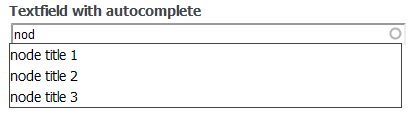
Drupal will visualize all above-mentioned the following way: